
우리프로젝트는 회원가입시에 이메일인증을 받도록 구현할 예정이다.
이런느낌의 회원가입 페이지를 만들어서 이메일인증버튼을 누르면 바로 밑에 인풋창이 나와서
메일로 보낸 인증번호를 적게 되는 방식으로 구현하려고한다.
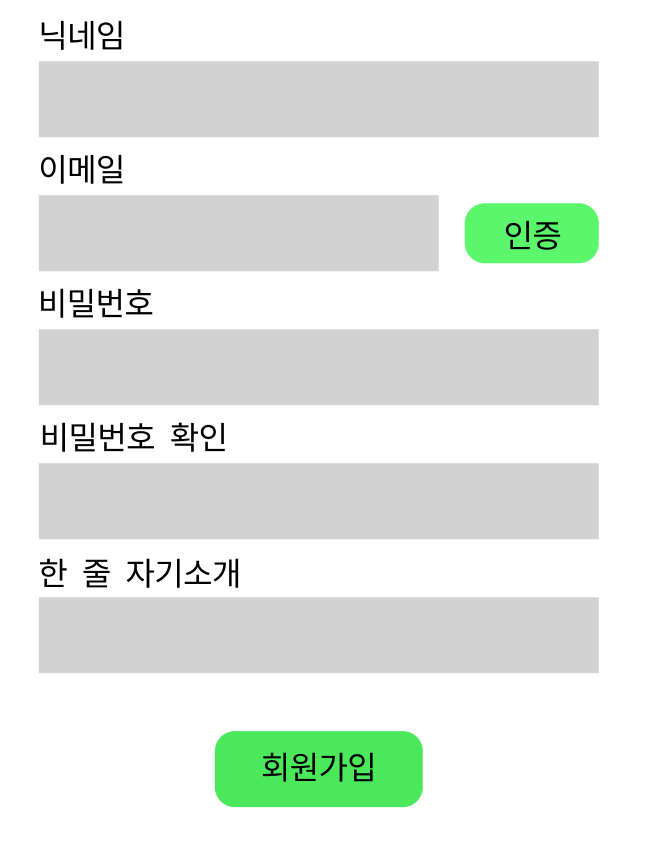
기존에 이메일인증을 작성한 로직은 이렇다.
모듈
import { Module } from '@nestjs/common';
import { MailService } from './mail.service';
import { MailController } from './mail.controller';

@Module({
  providers: [MailService],
  controllers: [MailController],
})
export class MailModule {}dto
import { ApiProperty } from '@nestjs/swagger';

export class SendMailDto {
  @ApiProperty()
  to: string;

  @ApiProperty()
  subject: string;

  @ApiProperty()
  html: string;
}import { IsInt } from 'class-validator';
import { ApiProperty } from '@nestjs/swagger';
export class VerifyCodeDto {
@ApiProperty()
@IsInt()
@ApiProperty({
description: 'code',
example: '12345',
})
code: number;
}컨트롤러
// mail.controller.ts
import { Controller, Post, Body, Req } from '@nestjs/common';
import { MailService } from './mail.service';
import { ApiBody, ApiTags } from '@nestjs/swagger';
import { SendMailDto } from './dto/sendmail.dto';
import { Request } from 'express'; // Request 객체를 가져오도록 수정
import { VerifyCodeDto } from './dto/verify-code.dto';

@Controller('mail')
@ApiTags('Mail')
export class MailController {
  constructor(private readonly mailService: MailService) {}

  @Post('send')
  //이건 나중에 바디가 아니라 딴걸로 리펙토링예정
  @ApiBody({
    type: SendMailDto,
  })
  async sendMail(
    @Req() req: Request, // Request 객체를 주입
    @Body('to') to: string,
    @Body('subject') subject: string
  ) {
    await this.mailService.sendMail(to, subject, req);
  }

  @Post('verify')
  @ApiBody({
    type: VerifyCodeDto, // VerifyCodeDto는 인증 코드를 받는 DTO입니다.
  })
  async verifyCode(@Body() verifyCodeDto: VerifyCodeDto) {
    const { code } = verifyCodeDto;
    const isVerified = this.mailService.verifyVerificationCode(code);

    if (isVerified) {
      return { message: '인증 성공' };
    } else {
      return { message: '인증 실패' };
    }
  }
}서비스
// mail.service.ts
import { HttpException, HttpStatus, Injectable } from '@nestjs/common';
import { Request } from 'express';
import * as nodemailer from 'nodemailer';

@Injectable()
export class MailService {
  private transporter;
  private verificationCodes = new Map<number, number>(); // 숫자를 사용하여 인증 번호 관리

  constructor() {
    this.transporter = nodemailer.createTransport({
      host: 'smtp.gmail.com',
      port: 587,
      secure: false,
      auth: {
        user: process.env.EMAIL_USER,
        pass: process.env.EMAIL_PASS,
      },
    });
  }

  generateRandomNumber = (min, max) => {
    return Math.floor(Math.random() * (max - min + 1)) + min;
  };

  async sendMail(to: string, subject: string, req: Request) {
    try {
      const email = req.body.to;
      console.log('이메일 확인 샌드 메일:', email);

      const verificationCode = this.generateRandomNumber(10000, 99999); // 5자리 랜덤 인증 번호 생성
      console.log('인증 번호 확인 샌드 메일:', verificationCode);

      await this.transporter.sendMail({
        from: process.env.EMAIL_USER,
        to: email,
        subject: subject,
        text: `인증 번호: ${verificationCode}`,
      });

      this.verificationCodes.set(verificationCode, verificationCode);

      console.log('메일이 전송되었습니다');
    } catch (error) {
      console.error('메일 전송 중 오류가 발생했습니다:', error);
      // throw new Error('메일 전송 중 오류가 발생했습니다');
      throw new HttpException(
        '메일 전송 중 오류가 발생했습니다',
        HttpStatus.INTERNAL_SERVER_ERROR
      );
    }
  }

  //인증번호 검증
  verifyVerificationCode(code: number): boolean {
    if (this.verificationCodes.has(code)) {
      this.verificationCodes.delete(code);
      return true;
    }
    return false;
  }
}이런식으로 코드를 구성하여 프론트에서 이메일 인증버튼을 클릭해서 컨트롤러의 내 이메일 샌드api를 요청하게되면
이메일이 발송된다. 그리고 난후 그 이메일에 적인 랜덤 인증번호 5자리를 인증번호 창에 입력하게되면
인증 성공 , 인증 실패 라는 메세지가 뜨게되면서 인증이 된 인증번호는 메모리에서 사라진다.
하지만 이렇게 짜고 나니 추가 해야할 부분이 생겼는데 . 메일로 보낸 인증번호의 유효기간 이 있어야 할 것 같았다.
그래서 이메일을 보낼때 인증번호를 추가해서 코드를 다시 수정하였다. (cookie에 코드를 넣어서 보관)
import { HttpException, HttpStatus, Injectable } from '@nestjs/common';
import { Request } from 'express';
import * as nodemailer from 'nodemailer';

@Injectable()
export class MailService {
  private transporter;
  private verificationCodes = new Map<number, number>(); // 숫자를 사용하여 인증 번호 관리

  constructor() {
    this.transporter = nodemailer.createTransport({
      host: 'smtp.gmail.com',
      port: 587,
      secure: false,
      auth: {
        user: process.env.EMAIL_USER,
        pass: process.env.EMAIL_PASS,
      },
    });
  }

  generateRandomNumber = (min, max) => {
    return Math.floor(Math.random() * (max - min + 1)) + min;
  };

  async sendMail(to: string, subject: string, req: Request) {
    try {
      const email = req.body.to;
      console.log('이메일 확인 샌드 메일:', email);

      const verificationCode = this.generateRandomNumber(10000, 99999); // 5자리 랜덤 인증 번호 생성
      console.log('인증 번호 확인 샌드 메일:', verificationCode);

      // 인증 번호를 쿠키에 저장하고 유효 기간을 설정
      const expires = new Date();
      expires.setTime(expires.getTime() + 1 * 60 * 1000); // 1분 후 만료 (테스트용으로 변경)

      // 쿠키 설정
      req.res.cookie('verificationCode', verificationCode.toString(), {
        expires,
      });

      await this.transporter.sendMail({
        from: process.env.EMAIL_USER,
        to: email,
        subject: '"local-mingle 인증메일입니다."',
        text: `인증 번호: ${verificationCode} 만료기간: ${expires}`,
      });

      this.verificationCodes.set(verificationCode, verificationCode);

      console.log('메일이 전송되었습니다');
    } catch (error) {
      console.error('메일 전송 중 오류가 발생했습니다:', error);
      throw new HttpException(
        '메일 전송 중 오류가 발생했습니다',
        HttpStatus.INTERNAL_SERVER_ERROR
      );
    }
  }

  //인증번호 검증
  verifyVerificationCode(code: number): boolean {
    if (this.verificationCodes.has(code)) {
      this.verificationCodes.delete(code);
      return true;
    }
    return false;
  }
}여기서 또하나의 오류가 생겼는데.
테스트를 하는 도중 (테스트시에는 1분으로 설정하였습니다.)
유효기간이 만료된 인증번호 또한 검증이 통과가 되어버렷다.
그래서 다시 코드를 살펴보다 인증번호 검증로직에 유효기간이 만료되면 에러가 생기도록 코드를 수정을 하지 않았었고
그래서 최종적으로 완성된 코드는 이렇다.
import { HttpException, HttpStatus, Injectable } from '@nestjs/common';
import { Request } from 'express';
import * as nodemailer from 'nodemailer';

@Injectable()
export class MailService {
  private transporter;
  private verificationCodes = new Map<
    number,
    { code: number; expires: number }
  >(); // 인증 번호 및 만료 시간 관리

  constructor() {
    this.transporter = nodemailer.createTransport({
      host: 'smtp.gmail.com',
      port: 587,
      secure: false,
      auth: {
        user: process.env.EMAIL_USER,
        pass: process.env.EMAIL_PASS,
      },
    });
  }

  generateRandomNumber = (min, max) => {
    return Math.floor(Math.random() * (max - min + 1)) + min;
  };

  async sendMail(to: string, subject: string, req: Request) {
    try {
      const email = req.body.to;
      console.log('이메일 확인 샌드 메일:', email);

      const verificationCode = this.generateRandomNumber(10000, 99999); // 5자리 랜덤 인증 번호 생성
      console.log('인증 번호 확인 샌드 메일:', verificationCode);

      // 인증 번호와 유효 기간을 저장
      const expires = Date.now() + 5 * 60 * 1000; // 5분 후 만료
      this.verificationCodes.set(verificationCode, {
        code: verificationCode,
        expires,
      });

      // 쿠키 설정
      req.res.cookie('verificationCode', verificationCode.toString(), {
        expires: new Date(expires),
      });

      await this.transporter.sendMail({
        from: process.env.EMAIL_USER,
        to: email,
        subject: '"local-mingle 인증메일입니다."',
        text: `인증 번호: ${verificationCode}
        만료기간: ${new Date(expires)}`,
      });

      console.log('메일이 전송되었습니다');
    } catch (error) {
      console.error('메일 전송 중 오류가 발생했습니다:', error);
      throw new HttpException(
        '메일 전송 중 오류가 발생했습니다',
        HttpStatus.INTERNAL_SERVER_ERROR
      );
    }
  }

  // 인증번호 검증
  verifyVerificationCode(code: number): boolean {
    const storedCode = this.verificationCodes.get(code);

    if (storedCode && storedCode.expires >= Date.now()) {
      this.verificationCodes.delete(code);
      return true;
    }
    return false;
  }
}이코드를 실행하게되면이제
인증 번호: 72246
만료기간: Tue Oct 24 2023 19:11:34 GMT+0900 (대한민국 표준시)
이런식으로 메일이 발송된다.
'프로젝트' 카테고리의 다른 글
| 어떤 검색기능을 프로젝트에 적용하는가 (0) | 2023.10.19 |
|---|---|
| 프로젝트에 채팅기능 도입(디스코드연동 vs 소켓io) (0) | 2023.10.18 |
| 트러블슈팅 (0) | 2023.10.18 |
| 트러블 슈팅 카카오 최초 로그인시 자동 회원가입(닉네임 중복) (0) | 2023.10.16 |
| 트러블슈팅 카카오 소셜로그인 (0) | 2023.10.13 |
